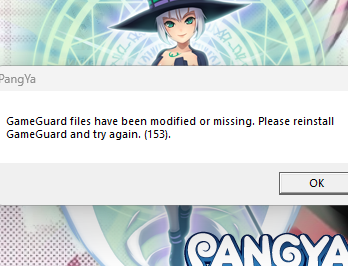
Okay so, every time i try to launch the game it always gives me this warning. I will say what I’ve already done to fix it but it has not worked.
1). Deleted and reinstalled the game
2). Deleted game guard and let the game patch itself on next start
3). Asked for someone else’s gameguard files and used it
4). Asked for someone else’s whole PR-client folder and used it
5). Turned off my antivirus / ran game as administrator
6). Tried running ProjectG in compatibility mode in Service pack 3
7). Added Japanese as an available language to my PC
8). Talked to 3 other people with the same issue, they never found a solution either. We are all on diff browsers too so its not a browser issue either.
Atp I’m at a loss even forums from 2013 and 2023 have no clear answer to fixing it, i even tried CHATGPT and it couldn’t help me fix it either. I need help badly please 
 discord → elenimeow | if anyone ever wants to dm me for quick replies
If I’m understanding your issue well, you are being shown the same error all the time, regardless of the fixes you’re applying to the installed files, is this correct?
The first thing that comes to mind is: make sure that you have only one installation of the game, i.e. that you are not modifying files installed in one path, while trying to run the game from another path.
What version of Windows are you using?
Another possible cause might be that you have installed another game which uses GameGuard (an anti-cheat rootkit), and this confuses the game. Pangya Reborn doesn’t need GameGuard to run, but it still has internal checks that GameGuard is installed, so a modified DLL is provided which mimics its behaviour. Do you have GameGuard among the installed apps? Do you have access to another PC where you can try to run the game?
Varthall
Yes with everything the SAME Exact error always shows up :(( It doesn’t change no matter what I do it’s the same error. I’m using windows 11. Yes I make sure to click the “Uninstall Pangya” and i make sure to delete any roaming files so I always redownload it in a clean slate.
Also, yes I looked for “GameGuard” in all my files and deleted a few more from other games I completely wiped Gamegaurd from my PC so only Pangya has it. No I don’t have access to another PC when I run it either :(( I should’ve mentioned i tried those too i have tried a lot.
Thank u Varthall please lmk if u have more ideas ^^
I’ll try to download the client, install it from scratch and see it I can reproduce the issue. Which link did you use to download it? In the meanwhile I’d run a complete antivirus scan on your PC, just in case…
Varthall
I downloaded it on the Proton link, and I ran an hour antivirus scan too and showed nothing :((
But when i open the Gameguard folder for me, the scripts is in all gibberish that might help
I have done a fresh install by uninstalling my previous installation, I have been able to enter the game without problems, I’ll now paste here all the steps I have done to install it, maybe you can check if there’s anything different from the steps you followed. All the steps have been run with the antivirus on:
- downloaded the “Reborn Setup” file (not the “Reborn Client”) from the Proton link
- unzipped it
- ran the Setup.exe (as a normal user, not as admin) and installed it under “Program Files”
- “Allow this app to make modications?” pressed “yes”
- the launcher automatically launches and it downloads all the updates
- once it shows “Update completed”, pressed Start, the login screen appears
I didn’t need to remove any file in the “Gameguard” folder, I left everything there untouched.
If it still doesn’t work, could you please zip and share on Google Drive/Proton/Mega your installation folder, so that I can compare it with my own?
Varthall